DEPLOYMENT PROTOCOL (INSTALLATION)
DEPLOYMENT PROTOCOL (INSTALLATION)
SYSTEM ALERT:
This unit contains a Raw Architecture File (.apk). It is designed for direct injection into the Wear OS environment.
>> NOT COMPATIBLE with Apple Watch.
// INSTALLATION PROTOCOL
We recommend the "Bridge Method" for the cleanest installation.
STEP 1: ACQUIRE THE BRIDGE
On your Android Phone, download the free utility app "GeminiMan WearOS Manager" from the Google Play Store.
STEP 2: PREPARE THE WATCH (CRITICAL)
1. On your Watch, go to Settings > System > Software Info.
2. Tap "Software Version" 7 times until it says "Developer Mode Turned On."
3. Go back to Settings > Developer Options.
4. Enable "Wireless Debugging."
5. IMPORTANT: Tap the text "Wireless Debugging" and select "Pair New Device."
>> Leave this screen open to see your Pairing Code.
STEP 3: CONNECT
1. Open GeminiMan on your phone.
2. Tap "Wireless Debugging" > "Pair New Device."
3. Enter the Code and Port Number shown on your watch.
STEP 4: INJECT SIGNAL
1. In GeminiMan, tap "Install APK."
2. Select the CRZA .apk file included in this folder.
3. The system will transfer the file.
STEP 5: ACTIVATE
Long-press your watch face, scroll right to "Add New," and select your new CRZA unit.
// SUPPORT
Signal interrupted? Contact Command: info@crzavisuallabs.com
CRZA VISUAL LABS
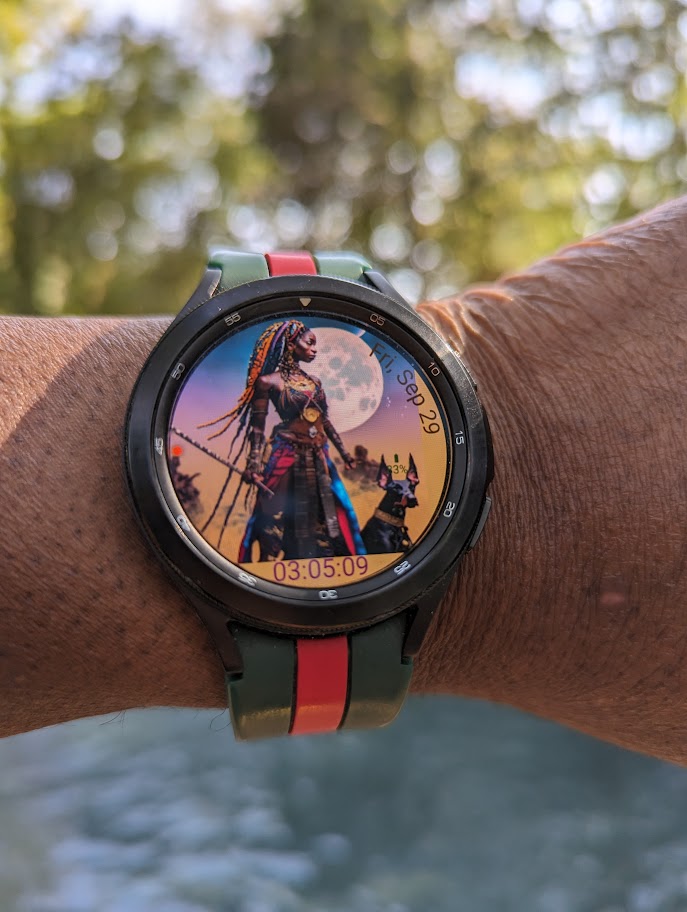
Queen with War Dog
Queen with War Dog
Couldn't load pickup availability
SAMURAI PROTOCOL // ARTIST // kINETIC SERIES
THE SIGNAL: THE MATRIARCH SENTINEL. The Queen & Beast Protocol visualizes the fiercely protective bond between the ruler and the guardian. It embodies the balance of grace and lethality. She does not need to speak; the guardian already knows the command.
Visual Architecture:
-
Style: Fantasy Realism / Duo Portrait.
-
Focus: Matriarchal Power.
The Closing:
Designed by EZY x CRZA VISUAL LABS. Visualize the Code.
Share